Phase 2: Creating Objectives & Assessment Materials Introduction: The objectives stated are designed for a particular targeted group (Audience) and will help determine what instructional material will be used (Condition). With objectives established we expect specific outcomes as a result (behavior) of the implementation of specific instructional material or technology-based solutions. We can examine the overall effect, either positive or negative, by determining the magnitude or scale (degree) of either improvement or decline in student performance. Student performance can be displayed in various forms (assessments). Depending on the behavior desired, we can determine what assessment best suits in each situation.
Objective Overview: According to the Illinois Online Network, the ABCD’s of Learning Objectives includes four characteristics that help an objective communicate an intent:
Audience (Target Group): Identifying who it is that will be doing the performance. The targeted group for my research project is 125 high school students in an introductory biology course taught by one teacher who teaches four classes with a class size average of 31 students. The audience range from freshman through junior year. There are no seniors in this course. The majority of the students are freshman. There are regular students in each class section. However, the majority of the students are low readers, and others have learning disabilities (eg., autistic, and ADD/ADHD) . There are few students that English is their second language and there are few students with physical disabilities.
Behavior (Performance): What will the learner(s) be able to do that is measureable? Students would be demonstrating the transfer of ‘sensory registers’ to ‘short term memory (STM)’. As students continue to practice the new knowledge acquired through activities such as individual/group projects and lab exercised, they will be able to potentially transfer the ‘STM’ or working memory to their ‘long term memory (LTM)’.
Condition (Available Resources): What will the learners be allowed to use and not use? The learners will be allowed to access information on the internet using their assigned netbooks. In the case of the juniors, they can follow along in class with students that have netbooks. All students are welcomed to access the internet at the media center, technology resource room, and at home (if available). Students will be responsible to follow the AUP set forth by the school district. Students will not be able to access YouTube on the school based netbooks issued at the beginning of the school year. However, educationally based and relevant YouTube videos can be displayed by the teacher using his/her laptop in conjunction with the SMARTboard.
Degree (Criterion): How well must their behavior (performance) be in terms of speed,accuracy,and quality? Students should be able to respond to questions asked related to information covered on the previous day within two minutes with at least 90% accuracy. Students should be able to respond to questions asked related to information covered during the previous week within five minutes with at least 90% accuracy. Students should be able to access information on the internet using the Webquest and/or other search tools within two minutes with at least 90% accuracy. Students should be able to complete the WebQuest activity successfully within the class period with 90% accuracy. 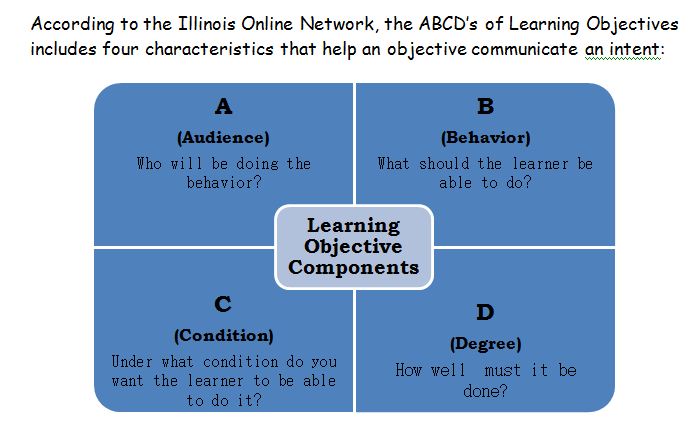 | Measurement:
1. Student survey 2. Science Concept Running Log 3. WebQuest Activty Sheet 4. Teacher observation of student active participation 5. Quiz and exam results reflecting student mastery of subject matter
Learning Objectives: 1. 80% of the students will be able to provide correct responses to class discussion questions or teacher directed questions after survey completion/reflection, completing their Science Concept Running Log and Web Quest with 90% accuracy. 2. At least half of the students will be able to achieve a score of 80% or better on their assessments after completing their Daily Unit Log, Web Quest with 90% accuracy, and completing assignments provided by the teacher. 3. Students will be able to actively utilize and complete Web Quest as an additional learning tool with 90% in order to make connections with prior knowledge and new knowledge related to the course Outcomes: 1.Students respond during class activities with frequent correct answers to topics previously covered. 2.Student test scores will reveal their skill mastery of concepts covered in class. However, test scores will be viewed in conjunction with other informal assessments that would reflect their knowledge base. 3.Students retrieve and complete Web Quest as they are posted in the teacher’s site on Moodle.
Assessment Overview: 1.Student completion of a “Student Survey “and “Science Concept Running Log”. The Survey will be reviewed and the findings will be reviewed and used as a tool to design meaningful WebQuest. The log will be evaluated by the teacher at the end of each unit and will be submitted with the WebQuest activity. 2.Student performance on formal assessments such as quizzes and unit tests of 80% or better. 3.Completion of Web Quest with over 90% accuracy.
Assessment: There must be a way to assess whether an objective or objectives have been met. Therefore the desired outcomes are being displayed. Assessments are the tool teachers can employ in order to demonstrate whether the objectives are met and the audience is exhibiting the desired outcome(s). The following methods are just a few ways of assessing outcomes: (1) written tests to assess skill achievement outcomes; (2) evaluation criteria checklist to assess complex task outcomes; (3) rubrics to assess complex task outcomes; (4) Liker scale-type surveys to assess attitude outcomes; and (5) observation instruments to measure frequency of behavior outcomes. Assessment: In this phase, I will be employing the following assessment tools: (1) a Liker-type assessment which is the “Student Survey” to determine the current motivation and recommendations from the audience (students); (2) a rubric entitled “I Think I Got It!” which will be used by the teacher to assess the student’s ability to grasp the concept(s) discussed in the Web Quest; and lastly a (3) criteria checklist entitled the “Running Student Log” which will be used by the students to reflect their active participation in classroom activities and reviewed by the teacher at the end of each unit.
Conclusion: “After reflecting on these goals, we felt that the ultimategoal was to provide a learning environment where students can feel like scientists in their own classroom. This meant that our students would need to be involved in the acquisition of their scientific knowledge by-not only reading and writing about- but actually doing science. Furthermore, we would want them to share and present their new found knowledge-not only with their classmates, but beyond-via the World Wide Web.” (Gabric, et.al.). In using the student survey, we are allowing students to provide their ideas on what will make their experience more stimulating and ultimately keep them engaged and motivated to learn more about the subject. The running student log will encourage students to be actively engaged in the day-to-day topics covered during each unit. The Web Quest activity will serve as a culminating activity that provides an overview of each unit while encouraging students to explore the resources on the web in order to provide additional academic support, and retraining. This technology-based solution will also provide advanced students resources that would provide a challenge. The ultimate goal is tomotivate students to be engaged in the class while encouraging scientific exploration using the web via the Web Quest activity. Students in turn are expected to increase their participation in class and greatly improve their knowledge skills that will be reflective on test scores and quality of work submitted throughout the course.
References: Gabric, K.M., Hovance, C.Z., Comstock, S.L., & Harnish, D.C. (2005). Scientist in Their Own Classroom: The Use of Type II Technology in the Science Classroom. Computers in the School. (22)3/4, 77-91. Illinois Online Network (ion) retrieved from: http://www.ion.uillinois.edu/resources/tutorials/id/developObjectives.asp Robyler, M.D., & Doering, A.H. (2010). Educational Technology into Teaching. (5th ed., pp 37-54). Boston, MA: Pearson Education
|
